A check is one visit to your website from our server, the same way a visitor's browser would open it.
How often
- Starter: every 5 minutes.
- Pro: every minute.
- Enterprise: every 30 seconds.
- Free trial: every 5 minutes.
What counts as up
A website is up when it answers within 15 seconds with a normal page (a status code from 200 to 399). We follow up to 5 redirects, so http:// to https:// or a move to www. is fine.
What counts as down
- No answer within 15 seconds.
- An error page, like 500 Internal Server Error, 503 Service Unavailable or 404 Not Found.
- The address can't be found (a DNS problem) or the server refuses the connection.
Why we wait for 3 failed checks
The internet has brief hiccups. One failed check on its own is usually nothing, so we only count an outage, and email you, after 3 failed checks in a row. After the first failure we check again within a minute (every 30 seconds on Enterprise), so a real outage is confirmed within about 2 minutes, or about a minute on Enterprise. The outage is then timed from the first failed check, so your reports show the real length of the downtime.
Check for words on the page
A page can load and still be broken, like a shop whose products don't show. A keyword check also treats a website as down when important text is missing, or when an error message appears. See Keyword checks.
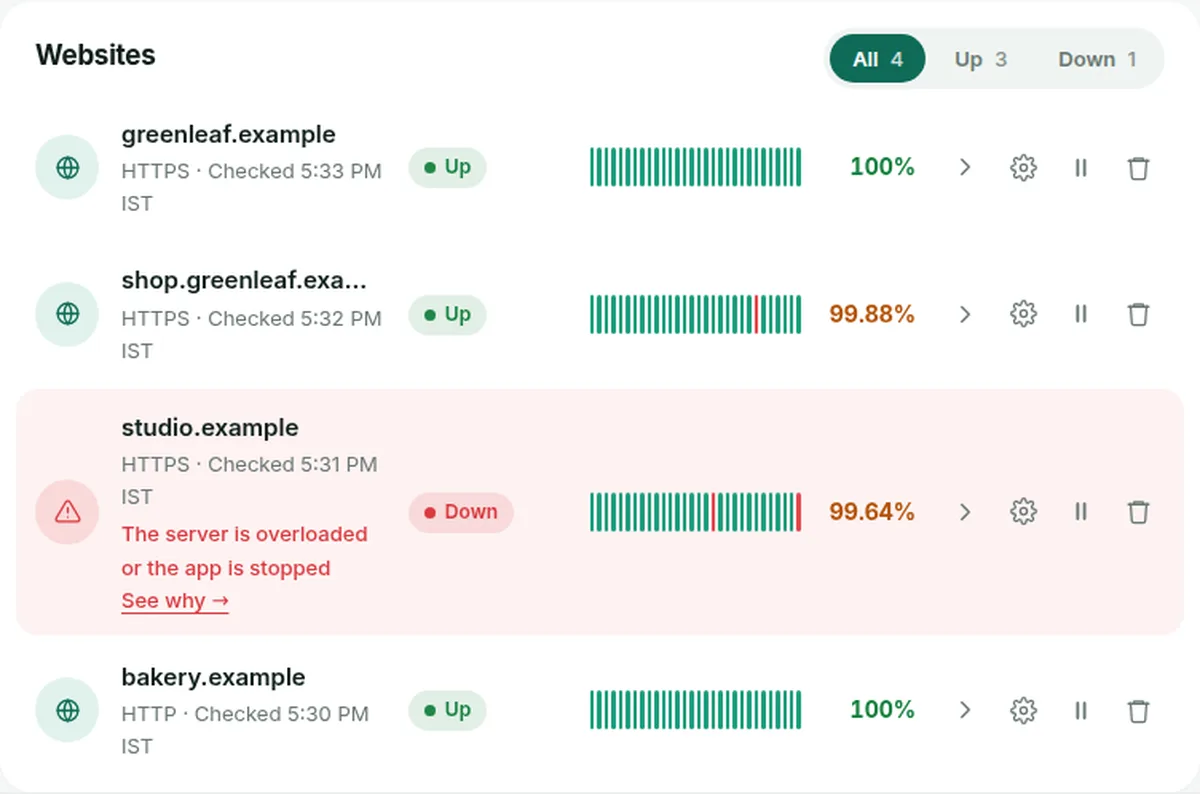
Reading the list of websites
- Up, Down or Paused shows the latest status. Keyword next to the address means a keyword check is on.
- Each small bar is one day: green with no outage, red with at least one, grey when there's no data yet.
- The percentage is the uptime over the last 30 days.