The Reports page shows any month since your account started. It's also emailed on the 1st for the month before.
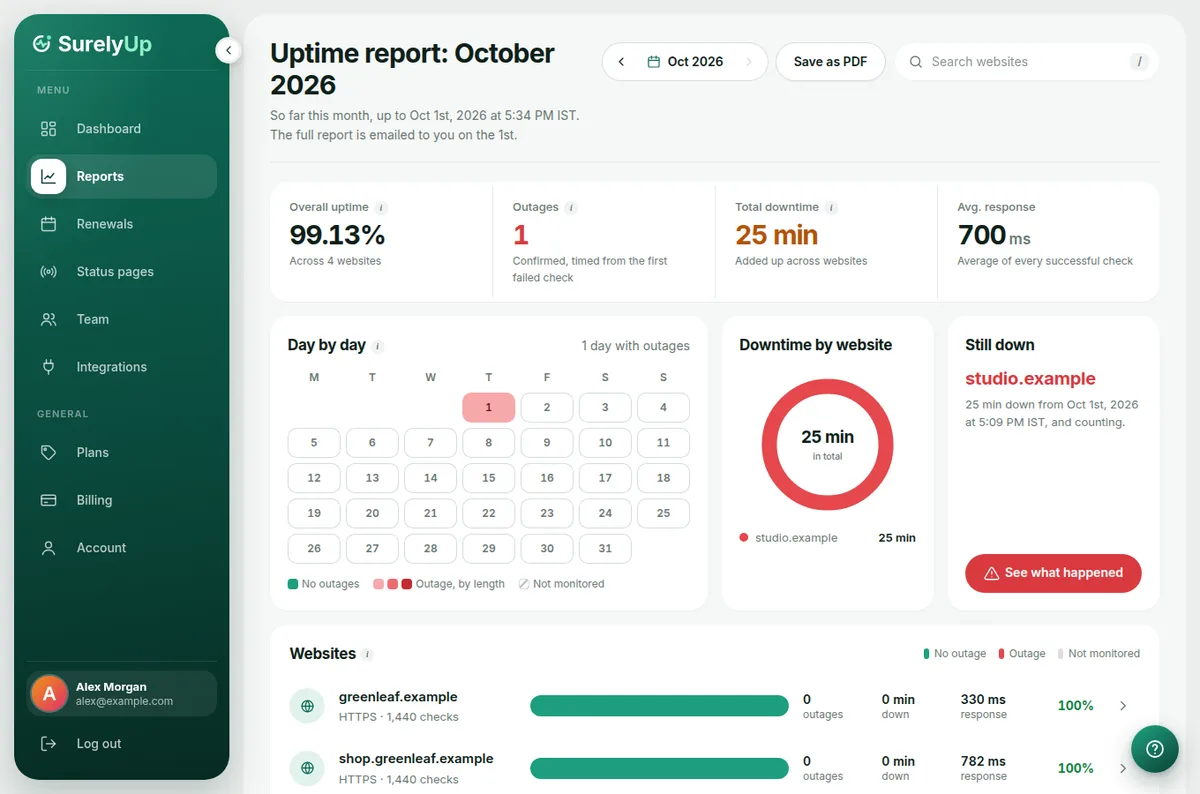
What's on the page
- The numbers along the top: overall uptime, how many outages, total downtime and average response time.
- Day by day: a calendar of the month. Red days had an outage; the darker the red, the longer it lasted.
- Downtime by website: which websites were down, and for how long.
- Longest outage: the outage worth a closer look, with a link to what happened.
- Websites and Outages: every website's numbers, and every outage with when it started and ended.
Switch month
Use the arrows next to the month at the top.
Share with a client
Click Save as PDF, then choose Save as PDF in your browser's print window. The menu and buttons are left out so it looks like a report. Or invite the client as a client viewer so they get their own report every month.
Tip: Only confirmed outages count, so a single failed check never lowers your uptime.