When a website goes down, SurelyUp works out the most likely reason in plain words, so you know whether to call your hosting company, your developer or nobody at all.
Open it
- Click See why under a website that's down on the dashboard, or See why it's down on the Needs attention card.
- Or click the › arrow at the end of any website's row, on the dashboard or the Reports page.
- The Down email links straight to it too.
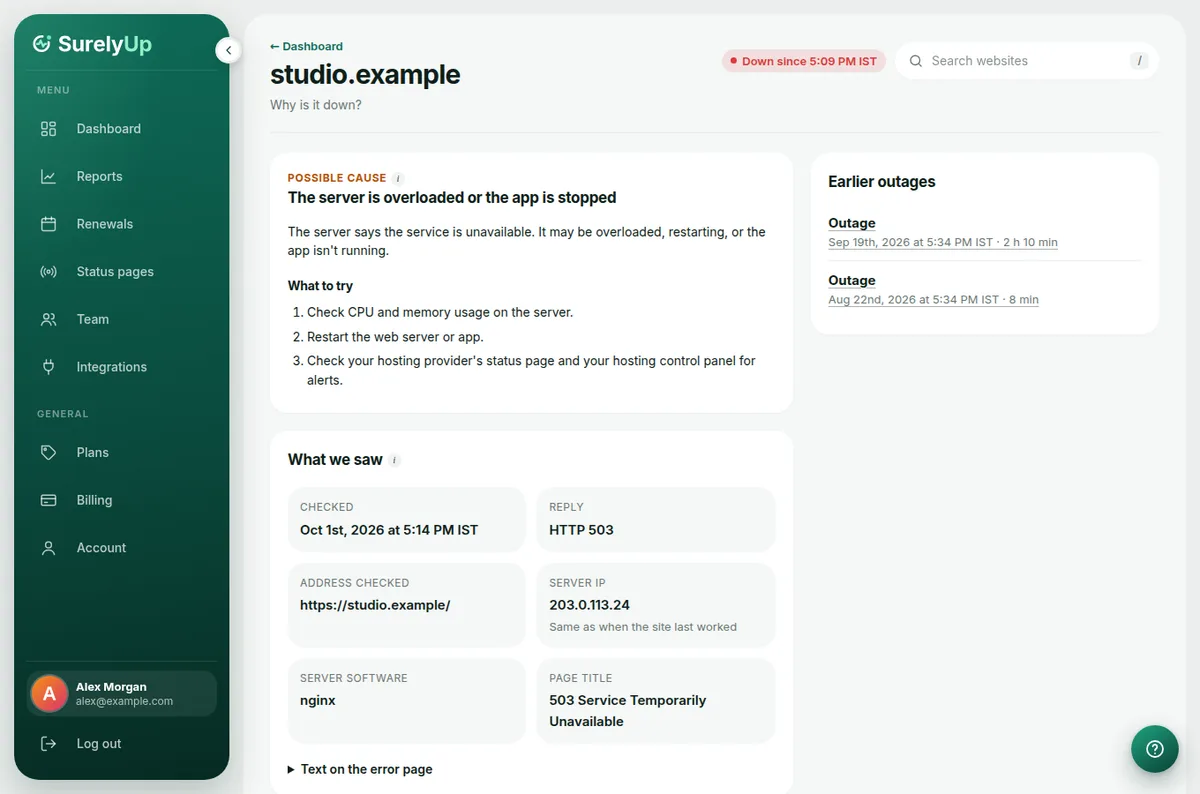
What's on the page
- Likely cause or Possible cause: likely when the error or the page itself says what's wrong, possible when it's our best guess.
- What to try: steps in order, safe to follow even if you're not technical.
- What we saw: the exact reply, the server's address, the page title and the DNS details. Send this to your developer or hosting support; it's what they'll ask for.
- Earlier outages: every past outage of the website, each with its own explanation.
When a keyword check failed
If the page loaded but a keyword check failed, the cause says which phrase was missing or showing, like The page is missing "Add to cart", and lists any others. If you changed the wording on your website on purpose, update the phrases in the website's settings.