Each website has its own alert settings. Open them from the gear button at the end of the website's row on the Dashboard.
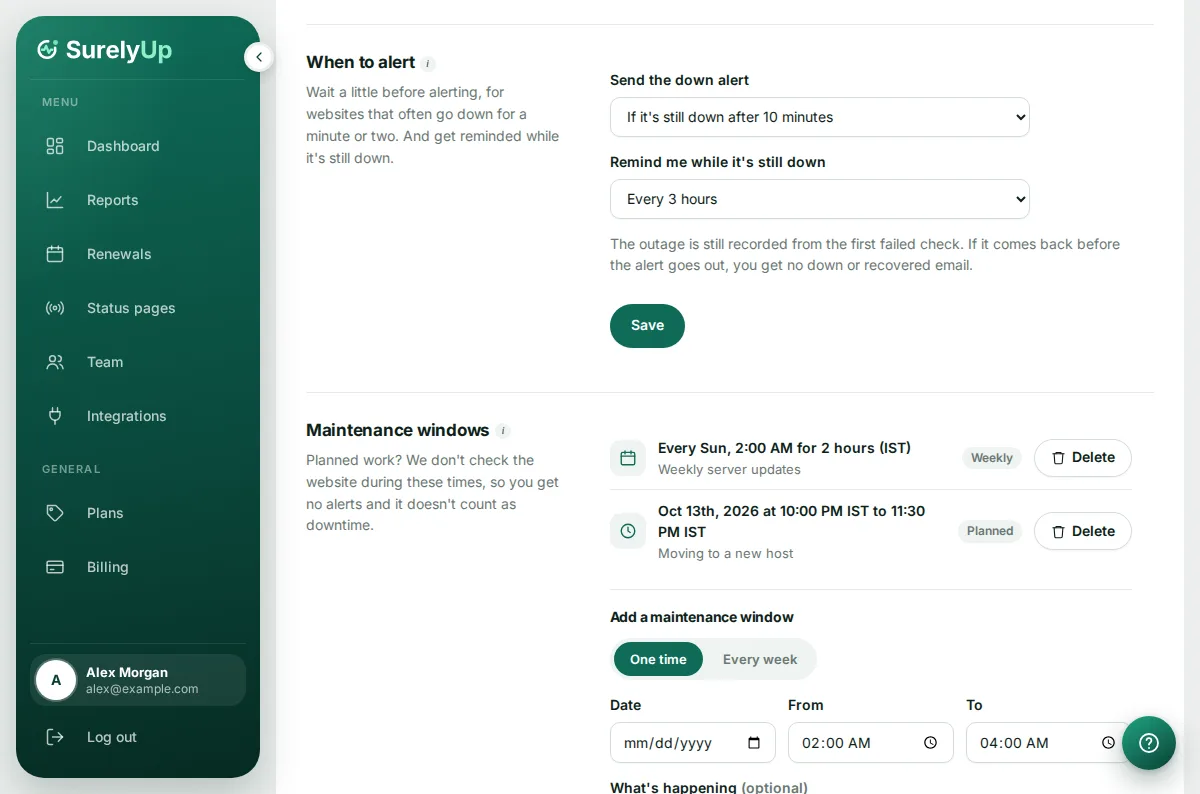
Maintenance windows
A maintenance window is a time when you're working on the website, like updates or a server move. We don't check it then, so nobody gets alerts and the time doesn't count as downtime.
- Under Maintenance windows, choose One time or Every week.
- For one time, pick the date and the start and end time. For every week, pick the days, the start time and how long it lasts.
- Add a note if you like, such as Server updates, then click Add window.
- Times are in your own time zone, set on your Profile.
- During a window the website shows Maintenance on the dashboard and on your status pages.
- When the window ends, we check the website straight away.
- If the website was already down when the window started, the outage carries on, since it wasn't part of the planned work.
- A website can have up to 10 windows. Delete one with its Delete button.
Alert delay
Some websites go down for a minute or two and come back on their own. Under When to alert, choose to get the down alert only if it's still down after 5, 10, 15 or 30 minutes, or an hour.
- The outage is still recorded from the first failed check, so your reports stay accurate.
- If the website comes back before the alert goes out, you get no down or recovered email.
Still-down reminders
Choose Remind me while it's still down to get another email every hour, 3 hours, 6 hours or once a day until the website is back. Webhooks, Slack and Discord get the reminder too.
Tip: Alert delay and reminders are per website, and the same for everyone on the team. Each person can still turn a website's alerts off for themselves in their profile.